


Page 220 - CITS - CSA - TP (Volume 2) - Hindi
P. 220
कं  ूटर सॉ वेयर ए ीके शन - CITS


                   frame.getContentPane().add(button);
                   frame.setSize(300, 150);

                   frame.setDefaultCloseOperation(JFrame.EXIT_ON_CLOSE);
                   frame.setVisible(true);

               }
           }
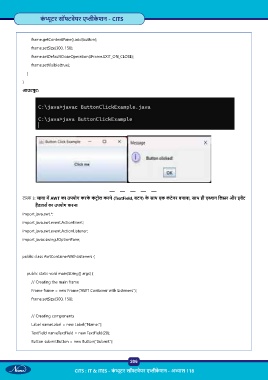
           आउटपुट:


           टा  3: जावा म  AWT का उपयोग करके  कं ट  ोल करने (TextField, बटन) के  साथ एक कं टेनर बनाना, साथ ही ए न िल र और इव ट
                 ह डलस  का उपयोग करना
           import java.awt.*;

           import java.awt.event.ActionEvent;
           import java.awt.event.ActionListener;

           import javax.swing.JOptionPane;


           public class AwtContainerWithListeners {


               public static void main(String[] args) {
                   // Creating the main frame

                   Frame frame = new Frame(“AWT Container with Listeners”);
                   frame.setSize(300, 150);


                   // Creating components
                   Label nameLabel = new Label(“Name:”);
                   TextField nameTextField = new TextField(20);

                   Button submitButton = new Button(“Submit”);


                                                           206

                                  CITS : IT & ITES - कं  ूटर सॉ वेयर ए ीके शन - अ ास 118

