


Page 302 - CITS - CSA - TP (Volume 2) - Hindi
P. 302
कं  ूटर सॉ वेयर ए ीके शन  - CITS


           2  फ़ाइल िलखना:
           •  fileptr.write(“Hello, this is a sample line.\n”): फ़ाइल की पहली पं   िलखता है।

           •  fileptr.write(“Writing another line to the file.\n”): फ़ाइल म  दू सरी पं   िलखता है।

           •  “\n” का  योग   ेक पं   के  अंत म  एक नया वण  जोड़ने के  िलए िकया जाता है।

           3  print(“Content has been written to the file.”):
           •  यह लाइन फ़ाइल िलखने के  िलए ज़ री नहीं है, लेिकन यह एक पुि करण मैसेज के   प म  काम करती है िक साम ी िलखी जा चुकी है।

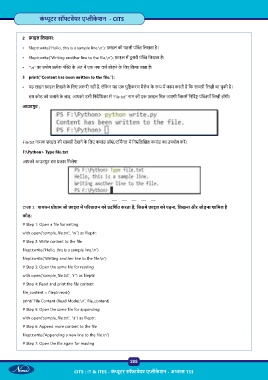
              इस कोड को चलाने के  बाद, आपको उसी िनद  िशका म  “file.txt” नाम की एक फ़ाइल िमल जाएगी िजसम  िनिद   पं  याँ िलखी होंगी।

           आउटपुट ;


           File.txt नामक फ़ाइल की साम ी देखने के  िलए कमांड  ॉ  /टिम नल म  िन िल खत कमांड का उपयोग कर ।
           F:\Python> Type file.txt

           आपको आउटपुट इस  कार िमलेगा


           टा  3 : पायथन  ो ाम जो फ़ाइल म  प रचालन को  दिश त करता है, िजसम  फ़ाइल को पढ़ना, िलखना और जोड़ना शािमल है
           कोड:
           # Step 1: Open a file for writing

           with open(“sample_file.txt”, “w”) as fileptr:
           # Step 2: Write content to the file
           fileptr.write(“Hello, this is a sample line.\n”)

           fileptr.write(“Writing another line to the file.\n”)
           # Step 3: Open the same file for reading

           with open(“sample_file.txt”, “r”) as fileptr:
           # Step 4: Read and print the file content
           file_content = fileptr.read()
           print(“File Content (Read Mode):\n”, file_content)

           # Step 5: Open the same file for appending
           with open(“sample_file.txt”, “a”) as fileptr:

           # Step 6: Append more content to the file
           fileptr.write(“Appending a new line to the file.\n”)
           # Step 7: Open the file again for reading


                                                           288

                                  CITS : IT & ITES - कं  ूटर सॉ वेयर ए ीके शन - अ ास 133

