


Page 142 - CITS - Sewing Technology - TT - Hindi
P. 142
ंइग टे ोलॉजी - CITS


           -   OK द
           -   सीम क ड  हो जाती है

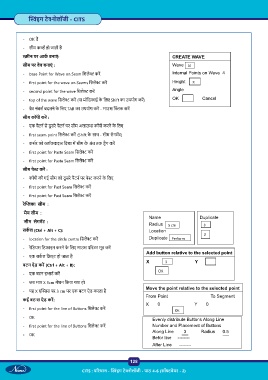
            ीन पर आक   बनाएं :                                                CREATE WAVE
           सीम पर वेव बनाएं  :                                                Wave  10

           -   base Point for Wave on Seam िसले  कर                           Internal Points on Wave  4
           -   first point for the wave on Seams िसले  कर                     Height    3
           -   second point for the wave िसले  कर                             Angle

           -   top of the wave िसले  कर  (या मॉिडफाई के  िलए Shift का उपयोग कर )  OK            Cancel
           -   वेव नंबस  बदलने के  िलए TAB का उपयोग कर  - माउस   क कर

           सीम कॉपी कर  :
           -   एक पैटन  से दू सरे पैटन  पर सीम अलाउ  कॉपी करने के  िलए
           -   first seam point िसले  कर  (Shift के  साथ - सीम सेगम ट)

           -   कस र को  ॉकवाइज िदशा म  सीम के  अंत तक ड ैग कर
           -   first point for Paste Seam िसले  कर

           -   first point for Paste Seam िसले  कर
           सीम पे  कर  :
           -   कॉपी की गई सीम को दू सरे पैटन  पर पे  करने के  िलए

           -   first point for Past Seam िसले  कर
           -   first point for Past Seam िसले  कर

           रे  का  सीम  :
            मैच सीम  :
                                                                   Name                   Duplicate
            सीम  सेगम ट  :
                                                                   Radius   5 cm               3
           सक  ल (Ctrl + Alt + C):                                 Location                  2
           -   location for the circle centre िसले  कर             Duplicate  Perform

           -   रेिडयस िडफाइन करने के  िलए माउस पॉइंटर मूव कर
                                                                  Add button relative to the selected point
           -   एक सक  ल ि एट हो जाता है
                                                                  X       3             Y
           बटन ऐड कर  (Ctrl + Alt + B):
                                                                       OK
           -   एक बटन इ ट  कर
           -   जब माप X 3cm म शन िकया गया हो
                                                                  Move the point relative to the selected point
           -   यह X ए  स पर 3 cm पर एक बटन ऐड करता है
                                                                  From Point                   To Segment
           कई बट  ऐड कर :
                                                                  X       0            Y       0
           -   first point for the line of Buttons िसले  कर                    OK
           -    OK
                                                                     Evenly distribute Buttons Along Line
           -   first point for the line of Buttons िसले  कर          Number and Placement of Buttons
                                                                     Along Line        3      Radius      0.5
           -   OK
                                                                     Befor line     --------
                                                                     After Line      --------


                                                           128

                                      CITS : प रधान -   ंइग टे ोलॉजी - पाठ 4-6 (सॉ वेयर - 2)

